Contact Bloom
One button that blooms into Call, Text, Viber, Messenger, WhatsApp and email: the channels customers already use.
npx shadcn@latest add @vibebox/contact-bloomControls
<ContactBloom />About
The shortest path from "I have a question" to a conversation. One button blooms into the channels a business actually answers: a call, a text, Viber, Messenger, WhatsApp, email. Each is a plain link showing its number or handle, opening the right app on a phone. Only the channels you pass appear, so it never shows a dead option. It sits in the flow or floats in the corner of the screen, blooms up or down, and behaves as a disclosure: the button toggles the list, Escape or a click outside closes it, and focus returns to the button. Made for Philippine businesses, where Viber and Messenger often matter more than a contact form. Original to VibeBox Motion.
Use it when
- A local business takes inquiries by phone or chat apps.
- A page needs one compact contact action that works on phones.
Skip it when
- Inquiries must go through a form (for records or routing); link to the form instead.
- The business does not answer a channel; leave it out.
Install
- 1Add the VibeBox registry to
components.json:{ "registries": { "@vibebox": "https://motion.vibeboxph.com/r/{name}.json" } } - 2Add the component with the shadcn CLI:
npx shadcn@latest add @vibebox/contact-bloom - 3Use it:
import { ContactBloom } from "@/components/vibebox/contact-bloom";

const channels = { phone: "0917 555 0142", viber: "+63 917 555 0142", messenger: "northlinedental", email: "hello@northline.ph" };

<ContactBloom channels={channels} position="fixed" />
Code
2 filescomponents/vibebox/contact-bloom/contact-bloom.client.tsx
/**
 * VibeBox Motion · Contact Bloom
 * Copyright (c) 2026 VibeBox. Licensed under the VibeBox Motion Free License:
 * https://motion.vibeboxph.com/license
 * Use it in unlimited personal, commercial and client projects.
 * Do not sell or redistribute it as a component, kit, template or builder.
 */
"use client";

import { useEffect, useId, useRef, useState, type CSSProperties, type ReactNode } from "react";
import { cn } from "@/lib/utils";

/*
 * One button that blooms into the ways customers actually reach a business: call, text,
 * Viber, Messenger, WhatsApp and email. Only the channels you pass appear. It is a disclosure:
 * the button toggles a list of plain links, Escape or a click outside closes it and returns
 * focus, and closed links leave the tab order. The bloom is CSS (transform and opacity).
 */

export type ContactChannels = {
  /** A phone number to call, as written ("0917 123 4567" or "+63 917 123 4567"). */
  phone?: string;
  /** A number for text messages. */
  sms?: string;
  /** A Viber number, in international format. */
  viber?: string;
  /** A Messenger username or page id (the part after m.me/). */
  messenger?: string;
  /** A WhatsApp number, in international format. */
  whatsapp?: string;
  email?: string;
};

type Channel = { key: keyof ContactChannels; label: string; detail: string; href: string; icon: ReactNode };

const digits = (value: string) => value.replace(/[^\d+]/g, "");

const ICON = {
  phone: <path d="M5 4h4l2 5-2.5 1.5a11 11 0 0 0 5 5L15 13l5 2v4a2 2 0 0 1-2 2A16 16 0 0 1 3 6a2 2 0 0 1 2-2Z" />,
  message: <path d="M4 5h16v11H8l-4 3.5V5Z" />,
  chat: <path d="M12 4c4.6 0 8 3.1 8 7s-3.4 7-8 7c-1 0-2-.1-2.9-.4L5 19l1.1-3.3A6.6 6.6 0 0 1 4 11c0-3.9 3.4-7 8-7Z" />,
  mail: <path d="M4 6h16v12H4zM4 7l8 6 8-6" />,
};

function channelsFrom(channels: ContactChannels): Channel[] {
  const list: Channel[] = [];
  if (channels.phone) list.push({ key: "phone", label: "Call", detail: channels.phone, href: `tel:${digits(channels.phone)}`, icon: ICON.phone });
  if (channels.sms) list.push({ key: "sms", label: "Text", detail: channels.sms, href: `sms:${digits(channels.sms)}`, icon: ICON.message });
  if (channels.viber) list.push({ key: "viber", label: "Viber", detail: channels.viber, href: `viber://chat?number=${encodeURIComponent(digits(channels.viber))}`, icon: ICON.chat });
  if (channels.messenger) list.push({ key: "messenger", label: "Messenger", detail: `m.me/${channels.messenger}`, href: `https://m.me/${encodeURIComponent(channels.messenger)}`, icon: ICON.chat });
  if (channels.whatsapp) list.push({ key: "whatsapp", label: "WhatsApp", detail: channels.whatsapp, href: `https://wa.me/${digits(channels.whatsapp).replace(/^\+/, "")}`, icon: ICON.chat });
  if (channels.email) list.push({ key: "email", label: "Email", detail: channels.email, href: `mailto:${channels.email}`, icon: ICON.mail });
  return list;
}

export type ContactBloomProps = {
  channels: ContactChannels;
  /** The button's text. */
  label?: string;
  /** "inline" sits in the flow; "fixed" floats in the bottom corner of the screen. */
  position?: "inline" | "fixed";
  /** Which way the channels bloom from the button. */
  direction?: "up" | "down";
  className?: string;
};

export function ContactBloom({ channels, label = "Contact us", position = "inline", direction = "up", className }: ContactBloomProps) {
  const [open, setOpen] = useState(false);
  const rootRef = useRef<HTMLDivElement>(null);
  const buttonRef = useRef<HTMLButtonElement>(null);
  const listId = useId();
  const list = channelsFrom(channels);

  useEffect(() => {
    if (!open) return;
    const onKey = (event: KeyboardEvent) => {
      if (event.key !== "Escape") return;
      setOpen(false);
      buttonRef.current?.focus();
    };
    const onPointer = (event: PointerEvent) => {
      if (!rootRef.current?.contains(event.target as Node)) setOpen(false);
    };
    document.addEventListener("keydown", onKey);
    document.addEventListener("pointerdown", onPointer);
    return () => {
      document.removeEventListener("keydown", onKey);
      document.removeEventListener("pointerdown", onPointer);
    };
  }, [open]);

  if (!list.length) return null;

  return (
    <div
      ref={rootRef}
      data-vb="contact-bloom"
      data-state={open ? "open" : "closed"}
      className={cn("relative inline-flex", position === "fixed" && "fixed right-4 bottom-4 z-50", className)}
    >
      <button
        ref={buttonRef}
        type="button"
        aria-expanded={open}
        aria-controls={listId}
        onClick={() => setOpen((value) => !value)}
        className="group inline-flex h-12 items-center gap-2.5 rounded-full bg-primary pr-5 pl-4 font-medium text-primary-foreground shadow-[0_12px_30px_-14px_rgb(0_0_0/0.55)] transition-transform duration-200 ease-expo-out focus-visible:outline-2 focus-visible:outline-offset-2 focus-visible:outline-ring active:scale-[0.97]"
      >
        <span aria-hidden="true" className="relative grid size-6 place-items-center">
          <svg viewBox="0 0 24 24" className="size-5 transition-[transform,opacity] duration-300 group-aria-expanded:scale-50 group-aria-expanded:rotate-90 group-aria-expanded:opacity-0" fill="none" stroke="currentColor" strokeWidth="1.8" strokeLinejoin="round">
            {ICON.chat}
          </svg>
          <svg viewBox="0 0 24 24" className="absolute size-5 scale-50 -rotate-90 opacity-0 transition-[transform,opacity] duration-300 group-aria-expanded:scale-100 group-aria-expanded:rotate-0 group-aria-expanded:opacity-100" fill="none" stroke="currentColor" strokeWidth="2" strokeLinecap="round">
            <path d="M6 6l12 12M18 6 6 18" />
          </svg>
        </span>
        {label}
      </button>
      <ul
        id={listId}
        aria-label={label}
        // Floats over the page, nearest channel first, so the button never moves.
        className={cn("absolute right-0 flex w-max gap-2", direction === "up" ? "bottom-full mb-3 flex-col-reverse" : "top-full mt-3 flex-col")}
      >
        {list.map((channel, index) => (
          <li
            key={channel.key}
            data-vb-cb-item=""
            style={{ "--vb-cb-i": index } as CSSProperties}
            className={cn(
              "flex justify-end transition-[opacity,transform,visibility] duration-300 ease-expo-out motion-reduce:transform-none",
              direction === "up" ? "origin-bottom-right" : "origin-top-right",
              open
                ? "visible translate-y-0 scale-100 opacity-100 delay-[calc(var(--vb-cb-i)*45ms)]"
                : cn("invisible scale-90 opacity-0", direction === "up" ? "translate-y-3" : "-translate-y-3"),
            )}
          >
            <a
              href={channel.href}
              className="flex min-h-11 items-center gap-3 rounded-full border border-border bg-popover py-1.5 pr-4 pl-1.5 text-popover-foreground shadow-[0_10px_24px_-16px_rgb(0_0_0/0.5)] transition-colors duration-150 hover:border-border-strong focus-visible:outline-2 focus-visible:outline-offset-2 focus-visible:outline-ring"
            >
              <span aria-hidden="true" className="grid size-8 shrink-0 place-items-center rounded-full bg-spectrum text-white">
                <svg viewBox="0 0 24 24" className="size-4" fill="none" stroke="currentColor" strokeWidth="1.8" strokeLinecap="round" strokeLinejoin="round">
                  {channel.icon}
                </svg>
              </span>
              <span className="flex flex-col leading-tight">
                <span className="text-small font-medium">{channel.label}</span>
                <span className="text-caption text-muted-foreground">{channel.detail}</span>
              </span>
            </a>
          </li>
        ))}
      </ul>
    </div>
  );
}
components/vibebox/contact-bloom/index.tsx
/**
 * VibeBox Motion · Contact Bloom
 * Copyright (c) 2026 VibeBox. Licensed under the VibeBox Motion Free License:
 * https://motion.vibeboxph.com/license
 * Use it in unlimited personal, commercial and client projects.
 * Do not sell or redistribute it as a component, kit, template or builder.
 */
export { ContactBloom, type ContactBloomProps, type ContactChannels } from "./contact-bloom.client";
Props
| Prop | Type | Default | Description |
|---|---|---|---|
| channels * | ContactChannels | — | { phone, sms, viber, messenger, whatsapp, email }: only the ones you pass appear. |
| label | string | "Contact us" | The button's text. |
| position | "inline" | "fixed" | "inline" | In the flow, or floating in the bottom corner. |
| direction | "up" | "down" | "up" | Which way the channels bloom. |
| className | string | — | Merged with cn(). |
Accessibility and motion
- Keyboard
- The button toggles the list (aria-expanded); Tab moves through the channel links; Escape closes and returns focus to the button.
- Screen readers
- A button and a labelled list of links, each named by channel with its number or address.
- Touch
- Links are at least 44 px tall; a tap outside closes the list.
- Reduced motion
- The channels fade in and out without moving.
Edge cases and limits
viber://andsms:links open apps on phones; on desktops without those apps they may do nothing, so keep a phone or email channel too.- A Messenger handle is the part after
m.me/.
Related
Booking Calendar
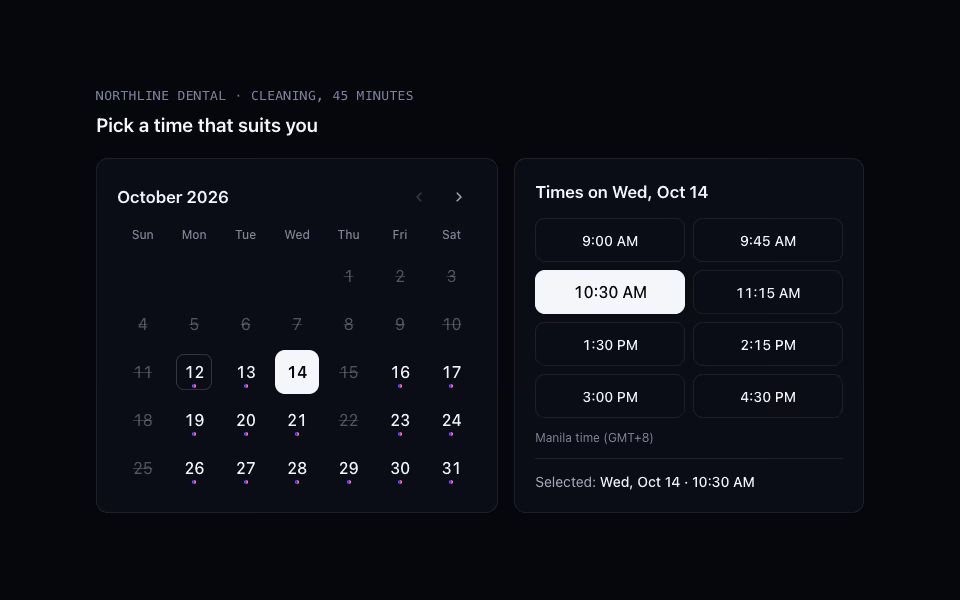
FreeA date and time-slot picker with a keyboard grid; availability arrives as props, so any booking back end fits.
Forms and booking · CSS